java对象和xml对象相互转换的工具类整理
依赖第三方sdk
1
2
3
4
5
6
7
8
9
10
11
|
<dependency>
<groupId>dom4j</groupId>
<artifactId>dom4j</artifactId>
<version>1.6.1</version>
</dependency>
<dependency>
<groupId>jaxen</groupId>
<artifactId>jaxen</artifactId>
<version>1.1-beta-6</version>
</dependency>
|
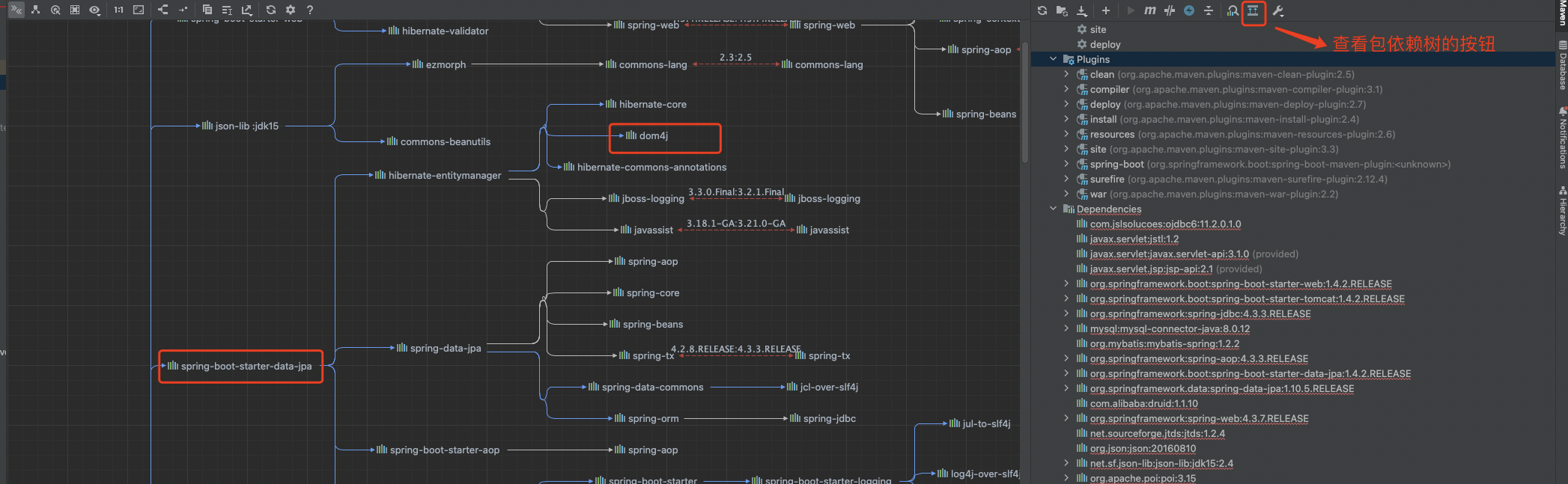
项目由于原先引入了spring-boot-starter-data-jpa,所以dom4j的jar包原先已经引入了,只要新引入jaxen的jar包即可,如图:
将xml文件对象转换成fastjson对象代码逻辑
1
2
3
4
5
6
7
8
9
10
11
12
13
14
15
16
17
18
19
20
21
22
23
24
25
26
27
28
29
30
31
32
33
34
35
36
37
38
39
40
41
42
43
44
45
46
47
48
49
50
51
52
53
54
55
56
57
58
59
60
61
62
63
64
65
66
67
68
69
70
71
72
73
74
75
76
77
78
79
80
81
82
83
84
85
86
87
88
89
90
91
92
93
94
95
96
97
98
99
100
101
102
103
104
105
106
107
108
109
110
111
112
113
114
115
116
| XmlUtil工具类
package com.geping.etl.utils;
import com.alibaba.fastjson.JSONArray;
import com.alibaba.fastjson.JSONObject;
import lombok.extern.slf4j.Slf4j;
import org.apache.commons.lang.StringUtils;
import org.dom4j.Document;
import org.dom4j.DocumentException;
import org.dom4j.Element;
import org.dom4j.io.SAXReader;
import java.io.File;
import java.util.Arrays;
import java.util.Iterator;
import java.util.List;
@Slf4j
public class XmlUtil {
static List complexNodeNames = Arrays.asList("REC","FILENAME","FORMAT","ERR");
public static JSONObject xmlToJson(File file, String node){
JSONObject result = new JSONObject(true);
SAXReader xmlReader = new SAXReader();
try {
Document document = xmlReader.read(file);
Element element;
if(StringUtils.isNotBlank(node)){
element = (Element) document.selectSingleNode(node);
}else{
element = document.getRootElement();
}
Iterator<Element> iterator = element.elementIterator();
while (iterator.hasNext()) {
Element child = iterator.next();
getNodes(child, result);
}
} catch (DocumentException e) {
log.error("xmlToJson error, fileName = {}, node = {}", file.getName(), node);
}
return result;
}
private static void getNodes(Element element, JSONObject jsonObject) {
String elementName = element.getName();
Object objectValue = checkElementName(elementName, element, jsonObject);
jsonObject.put(elementName, objectValue);
List<Element> elements = element.elements();
if (!elements.isEmpty()) {
JSONObject object = new JSONObject(true);
for (Element child : elements) {
getNodes(child, object);
}
if(complexNodeNames.contains(elementName)){
JSONArray jsonArray = jsonObject.getJSONArray(elementName);
if(jsonArray == null){
jsonArray = new JSONArray();
}
jsonArray.add(object);
jsonObject.put(element.getName(), jsonArray);
}else {
jsonObject.put(element.getName(), object);
}
}
}
private static Object checkElementName(String elementName, Element element, JSONObject jsonObject) {
if(complexNodeNames.contains(elementName)){
JSONArray jsonArray = jsonObject.getJSONArray(elementName);
if(jsonArray == null){
jsonArray = new JSONArray();
}
if(element.elements().isEmpty()) {
jsonArray.add(element.getText());
}
return jsonArray;
}
return element.getText();
}
单元测试类: XmlUtilTest
测试方法:
@Test
public void XmlToJSONObjectTest(){
File file = new File(this.getClass().getResource("").getPath()+"SACJP9131000071788122081501ERR.xml");
JSONObject jsonObject = XmlUtil.xmlToJson(file, null);
System.out.println(jsonObject.toJSONString());
}
|
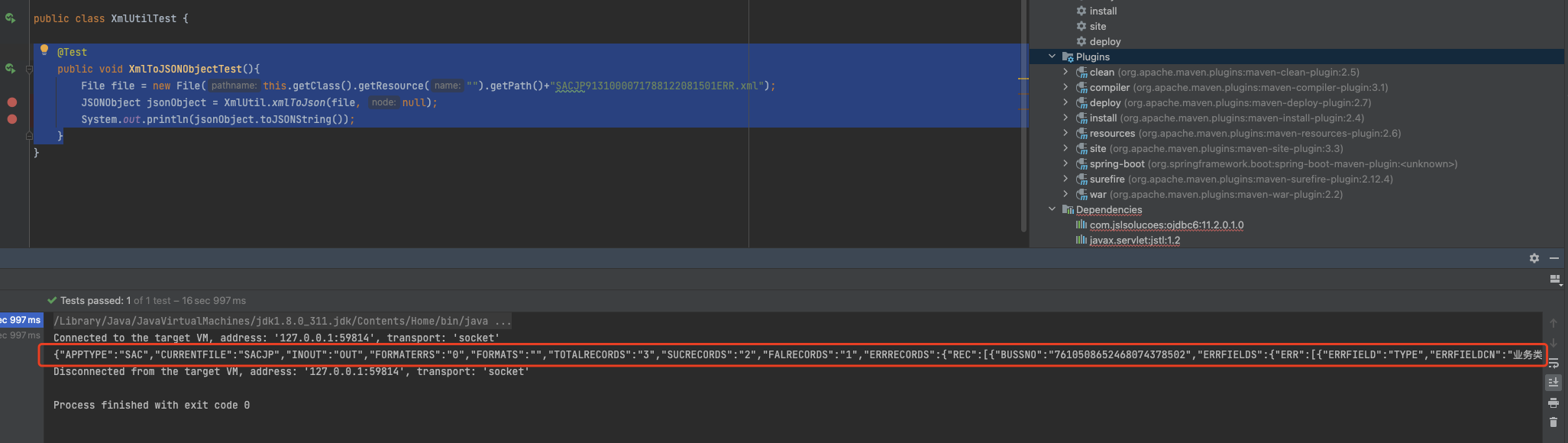
测试结果见下图:
将javaBean对象转换成xml对象文件
CreateReportFileServiceImpl 生成报文service实现类
1
2
3
4
5
6
7
8
9
10
11
12
13
14
15
16
17
18
19
20
21
22
23
24
25
26
27
28
29
30
31
32
33
34
35
36
37
38
39
40
41
42
43
44
45
46
47
48
49
50
51
52
53
54
55
56
57
58
59
60
61
62
63
64
65
66
67
68
69
70
71
72
73
74
75
76
77
78
79
80
81
82
83
84
85
86
87
88
89
90
91
92
93
94
95
96
97
98
99
100
101
|
public void beanToXml(String fatherElement, List objects, String filePath) throws IOException, IllegalAccessException {
try {
Document document = DocumentHelper.createDocument();
Element fatherStore = document.addElement("MSG");
Element childStore1 = fatherStore.addElement("APPTYPE");
childStore1.setText("SAC");
Element childStore2 = fatherStore.addElement("CURRENTFILE");
childStore2.setText(fatherElement);
Element childStore3 = fatherStore.addElement("INOUT");
childStore3.setText("IN");
Element childStore4 = fatherStore.addElement("TOTALRECORDS");
childStore4.setText(String.valueOf(objects.size()));
Element childStore5 = fatherStore.addElement("RECORDS");
for (int i = 0; i < objects.size(); i++) {
Element instanceElement = childStore5.addElement("REC");
for(Field field : objects.get(i).getClass().getDeclaredFields()){
field.setAccessible(true);
String fieldName = field.getAnnotation(XColumn.class).desc();
Element fieldElement = instanceElement.addElement(fieldName);
int type = field.getAnnotation(XColumn.class).type();
if(type == DataType.type_date) {
fieldElement.setText(field.get(objects.get(i)) != null ? field.get(objects.get(i)).toString().replace("-", "") : "");
}else{
fieldElement.setText(field.get(objects.get(i)) != null ? field.get(objects.get(i)).toString() : "");
}
}
}
OutputFormat format = OutputFormat.createPrettyPrint();
format.setEncoding("UTF-8");
File file = new File(filePath);
XMLWriter writer = new XMLWriter(new FileOutputStream(file), format);
writer.setEscapeText(false);
writer.write(document);
writer.close();
} catch (Exception e) {
log.error("beanToXml error, filePath = {}, e = {}", filePath, e);
throw e;
}
}
@Test
public void JavaBeanToXmlTest() throws IOException, IllegalAccessException {
CreateReportFileServiceImpl createReportFileService = new CreateReportFileServiceImpl();
List<SacjpEntity> sacjpEntities = new ArrayList<>();
SacjpEntity sacjpEntity = new SacjpEntity();
sacjpEntity.setAcctNo("1111");
sacjpEntity.setActionDesc("2222");
sacjpEntity.setBranchName2("33333");
sacjpEntity.setBusCode("4444444");
sacjpEntity.setCustCod("555555");
sacjpEntity.setCustContact("6666666");
sacjpEntity.setCustNm("77777777");
sacjpEntity.setBranchName2("88888888");
sacjpEntity.setCustContact("99999999");
sacjpEntity.setDealAmount("333333");
sacjpEntity.setMac("343434343");
SacjpEntity sacjpEntity1 = new SacjpEntity();
sacjpEntity1.setAcctNo("123");
sacjpEntity1.setActionDesc("123");
sacjpEntity1.setBranchName2("123");
sacjpEntity1.setBusCode("123");
sacjpEntity1.setCustCod("123");
sacjpEntity1.setCustContact("123");
sacjpEntity1.setCustNm("123");
sacjpEntity1.setBranchName2("123");
sacjpEntity1.setCustContact("123");
sacjpEntity1.setDealAmount("123");
sacjpEntity1.setMac("123");
sacjpEntities.add(sacjpEntity);
sacjpEntities.add(sacjpEntity1);
createReportFileService.beanToXml("测试文件", sacjpEntities, "11.xml");
}
|
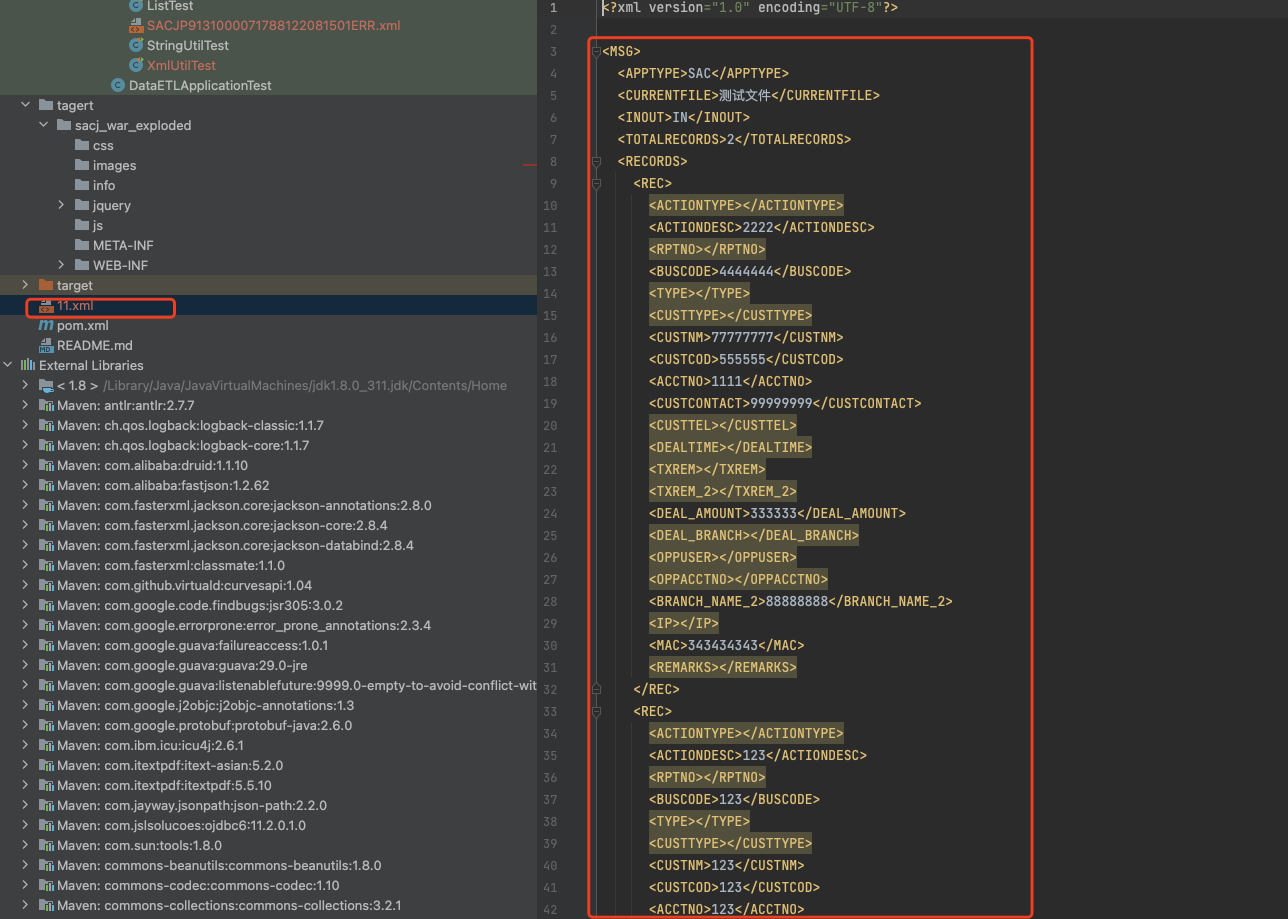
测试结果见下图:
遇到的问题:
执行Xml转换成fastjson代码遇到的异常:java.lang.NoClassDefFoundError: org/jaxen/JaxenException的异常
原因:找不到JaxenException异常类.因为jaxen的jar包没有引入到项目中,把jaxen引入即可.
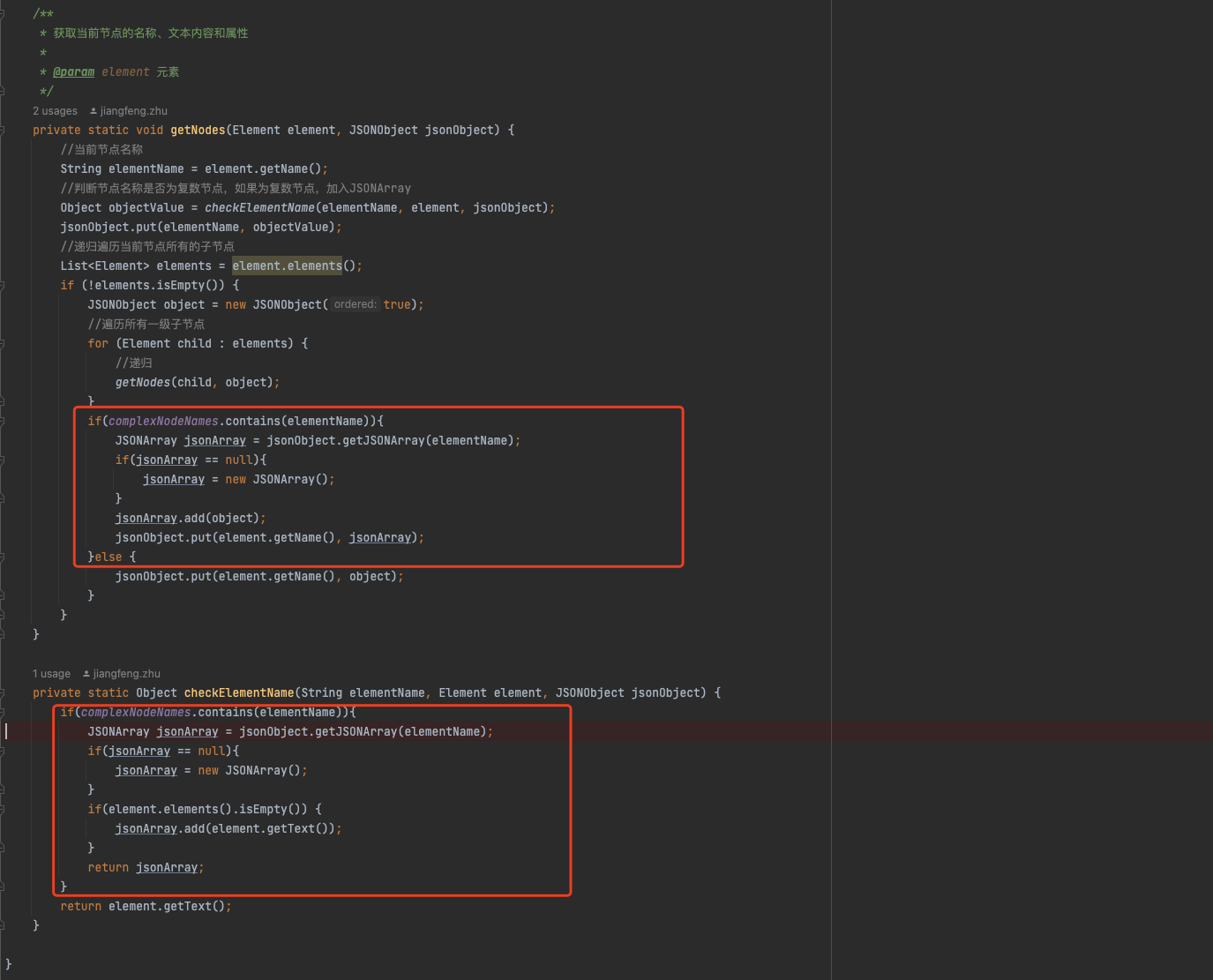
xml文件有多个重复标签时需转换成jsonArray数组的问题,加入如下图红色框里面的逻辑处理代码即可解决
参考博客:
https://codeantenna.com/a/FjxTwSUpnS –代码实现参考博客
