Windows环境服务迁移
操作包含的所有指令(以109的oracle数据库为例)
1
2
3
4
5
6
7
8
9
10
11
12
13
14
15
16
17
18
19
20
21
22
| #查询数据库目录结构
select * from DBA_DIRECTORIES;
#创建directory目录(navicat)
#109
create or replace directory full_dump as 'D:\oracle';
create or replace directory full_dump as 'F:\app\data';
#231
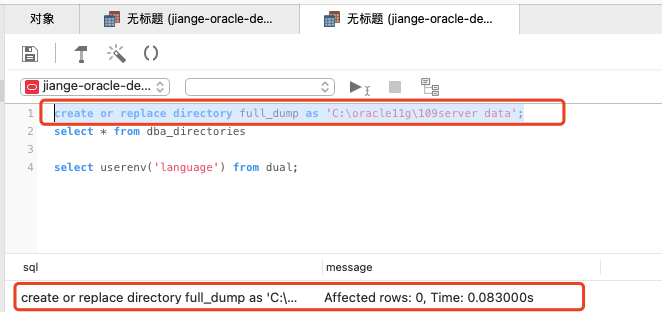
create or replace directory full_dump as 'C:\oracle11g\109server data';
create or replace directory full_dump as 'C:\database\oracle\data';
#查询此前目录是否创建成功(navicat)
select * from dba_directories
#导出dmp文件(109的cmd窗口)
expdp system/123456 directory=full_dump dumpfile=full_oracle.dmp full=y logfile=full_oracle.log
expdp system/root directory=full_dump dumpfile=full_oracle.dmp full=y logfile=full_oracle.log
#导入dmp文件(231的cmd窗口)
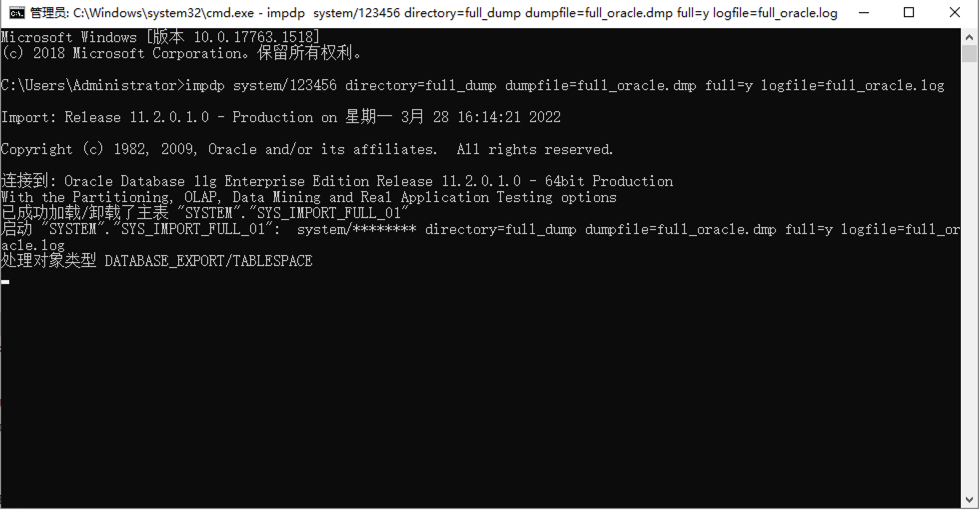
impdp system/123456 directory=full_dump dumpfile=full_oracle.dmp full=y logfile=full_oracle.log
impdp system/root directory=full_dump dumpfile=full_oracle.dmp full=y logfile=full_oracle.log
|
具体步骤
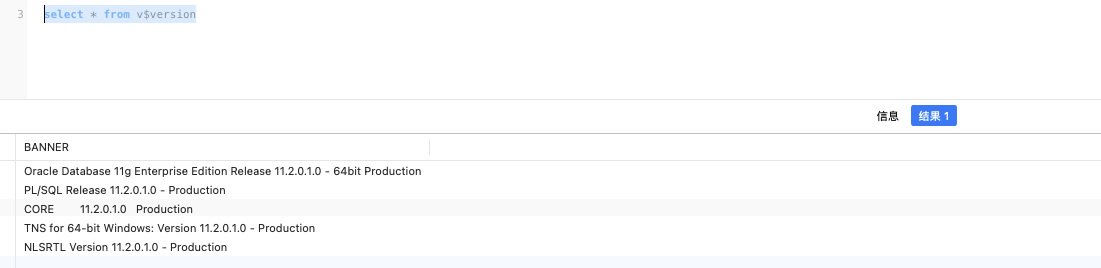
1.使用navicat查看数据库版本信息:
2.使用navicat创建directory目录:
create or replace directory full_dump as ‘F:\oracle’;
3.查看directory是否创建成功:

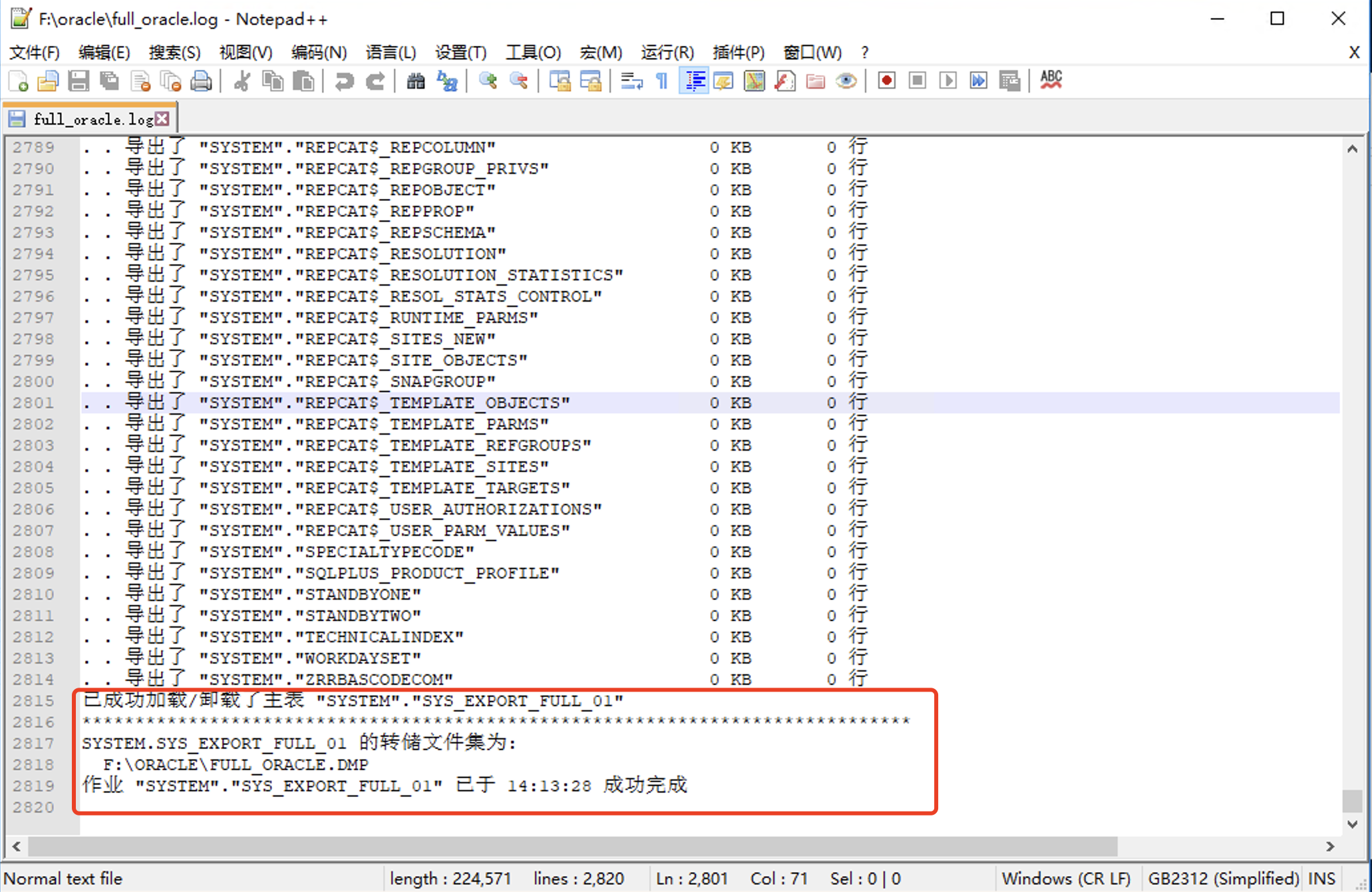
4.远程登录109服务器,在fpan创建oracle,并打开cmd,输入expdb full备份语句:

5.可查看f盘oracle文件夹下面日志full_oracle.log是否导出完成
6.将full_dump.dmp文件拿出传到目标服务器(231)上

7.使用navicat在目标服务器上创建directory目录

8.在目标服务器上使用impdp导入dmp(源数据备份dmp在目标服务器存放路径:C:\oracle11g\109server data下)
9.查看日志是否已完成,有错误不用担心,很多是数据库已存在的原因
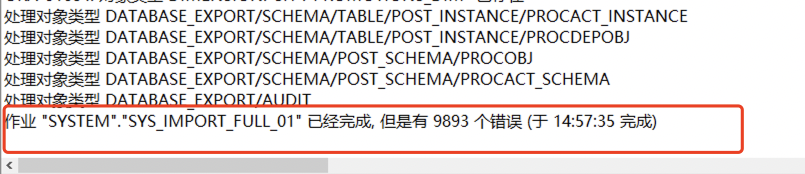
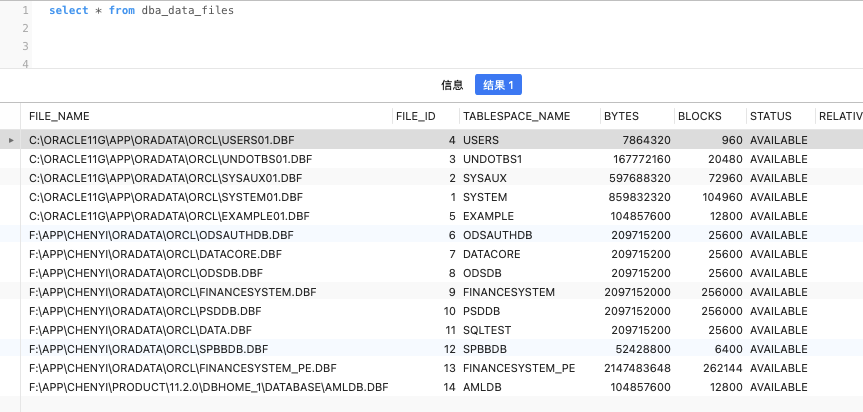
10.用navicat连上数据库 和原先做对比是否一致:
目标数据库:
原数据库:
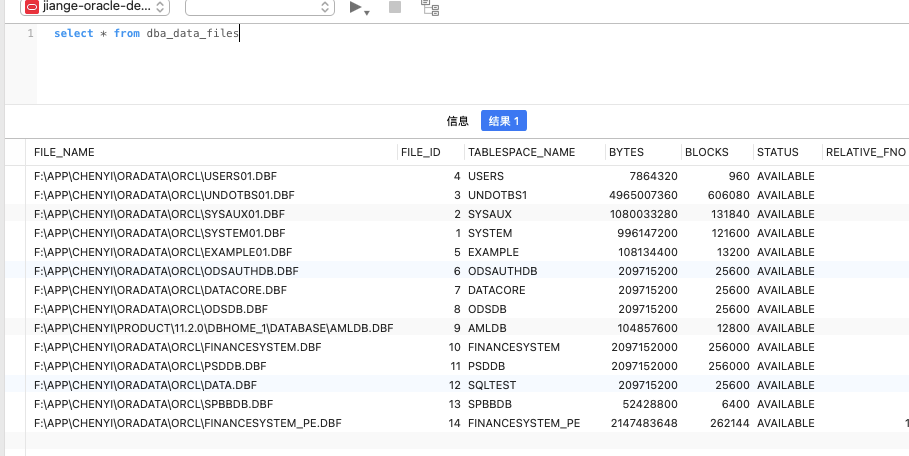
一致,迁移成功。
遇到的问题
1.迁移目标数据库的盘符目录结构和源数据库的盘符目录结构不一致:

解决办法:使用PA分区助手调整成一样的磁盘结构(PA分区打开提取密码为1122)

选择对应盘符,调整合适大小:

点击提交,根据提示需要重复服务,重启完成之后盘符就修改成功了

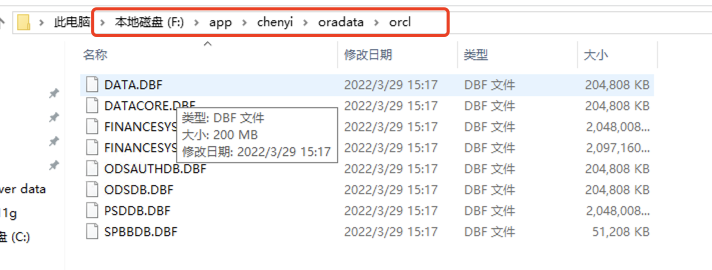
2.创建表空间时提示系统找不到指定的路径

解决办法:文件夹没有创建,创建对应的文件夹目录:
3.之前有表空间文件不在一个盘符下的:

解决办法:先修改源数据库的表空间的文件存放路径,在备份迁移:
1
2
3
4
5
6
7
8
9
10
| #源服务器上连接oracle数据库
sqlplus / as sysdba
#关闭服务
shutdown immediate;
#启动服务
startup mount;
#修改对应表空间文件目录机构 注意需要将对应的表空间文件复制到对应新目录在执行
alter database rename file 'D:\DATA.DBF' to 'F:\APP\CHENYI\ORADATA\ORCL\DATA.DBF';
#启动数据库
alter database open;
|
4.目标数据库的空间和愿数据库的空间做比对,发现少了一个数据库表空间,经查发现还是文件夹路径不正确
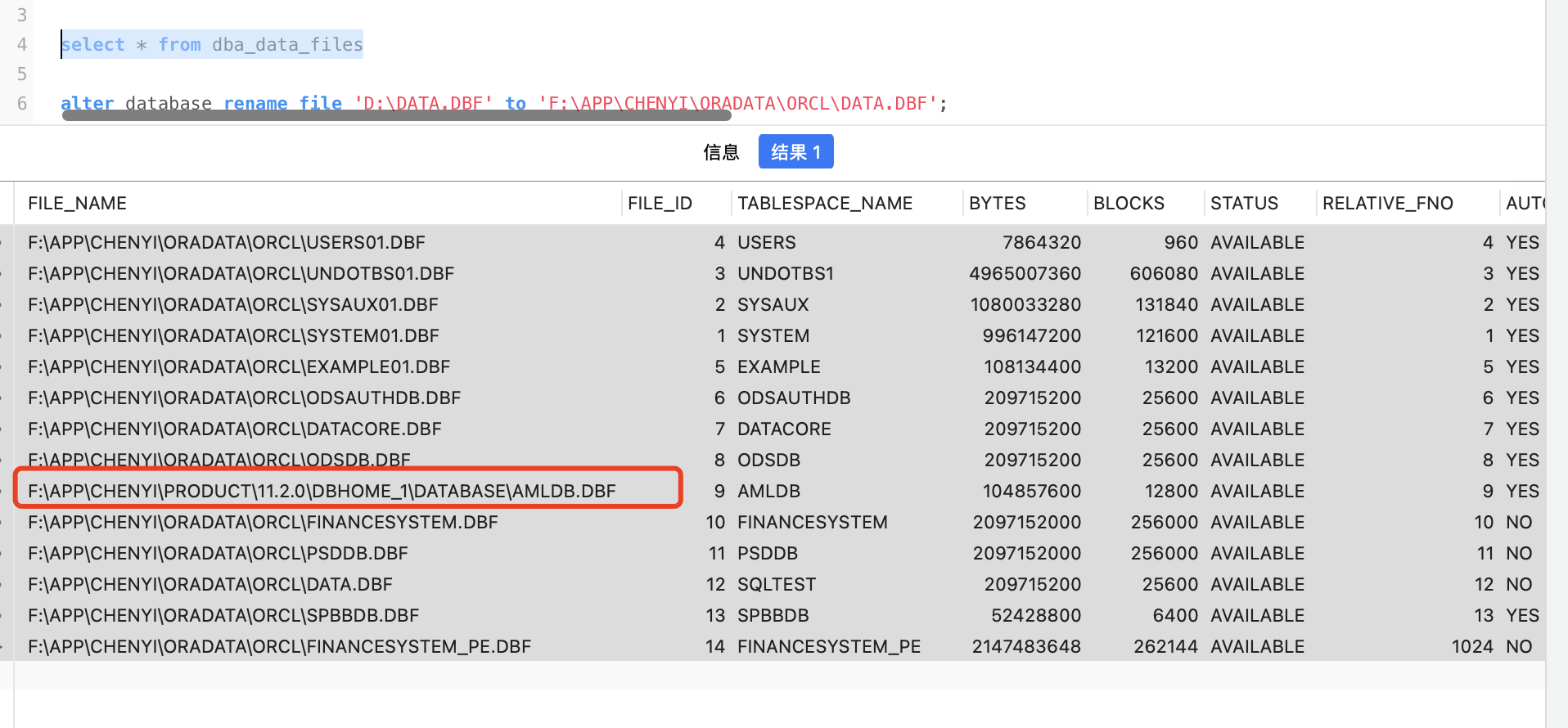
解决办法: 创建对应文件夹目录
- 参考网站:
https://gavin-wang-note.github.io/2010/09/22/oracle-expdp_impdp/
https://www.geek-share.com/detail/2469716840.html
Linux oracle数据库迁移
- 操作包含的所有指令(以151的oracle数据库为例)
1
2
3
4
5
6
7
8
9
10
11
12
13
14
15
16
17
18
19
20
21
22
23
24
25
26
27
28
29
30
31
32
33
34
35
36
37
38
39
40
41
42
43
44
45
46
47
48
49
50
51
52
53
54
55
56
57
58
59
60
61
62
63
64
| #查询数据库目录结构
select * from DBA_DIRECTORIES;
#按schema用户导出(151 导出USERS_CORE_EAST2(用户管理)、HREPORT、MYDATACORE、MYREPORT(1104)、FINANCESYSTEM_X7(金基)、COMMON_IMPORT_IMAS(demo演示使用)COMMON_IMPORT_EAST2(数据补录)、RATE_FILING(IMAS)、USER_CORE、COMMON_IMPORT(数据仓库))
#创建demo的备份目录
create or replace directory demo_dmp as '/data/oracle/admin/orcl/dpdump/demo';
select * from dba_Users;
expdp system/123456 schemas=USERS_CORE_EAST2 dumpfile=USERS_CORE_EAST2.dmp directory=DEMO_DMP logfile=USERS_CORE_EAST2.log;
expdp system/123456 schemas=HREPORT dumpfile=HREPORT.dmp directory=DEMO_DMP logfile=HREPORT.log;
expdp system/123456 schemas=MYDATACORE dumpfile=MYDATACORE.dmp directory=DEMO_DMP logfile=MYDATACORE.log;
expdp system/123456 schemas=MYREPORT dumpfile=MYREPORT.dmp directory=DEMO_DMP logfile=MYREPORT.log;
expdp system/123456 schemas=FINANCESYSTEM_X7 dumpfile=FINANCESYSTEM_X7.dmp directory=DEMO_DMP logfile=FINANCESYSTEM_X7.log;
expdp system/123456 schemas=COMMON_IMPORT_EAST2 dumpfile=COMMON_IMPORT_EAST2.dmp directory=DEMO_DMP logfile=COMMON_IMPORT_EAST2.log;
expdp system/123456 schemas=RATE_FILING dumpfile=RATE_FILING.dmp directory=DEMO_DMP logfile=RATE_FILING.log;
expdp system/123456 schemas=USER_CORE dumpfile=USER_CORE.dmp directory=DEMO_DMP logfile=USER_CORE.log;
expdp system/123456 schemas=COMMON_IMPORT dumpfile=COMMON_IMPORT.dmp directory=DEMO_DMP logfile=COMMON_IMPORT.log;
expdp system/123456 schemas=COMMON_IMPORT_IMAS dumpfile=COMMON_IMPORT_IMAS.dmp directory=DEMO_DMP logfile=COMMON_IMPORT_IMAS.log;
#按schema用户导出198
select * from DBA_DIRECTORIES;
select * from dba_Users;
create or replace directory demo_dmp as 'D:\oracle11\app\oracle/admin/xe/dpdump/';
expdp system/123456 schemas=USERS_CORE_EAST2 dumpfile=USERS_CORE_EAST2.dmp directory=DEMO_DMP logfile=USERS_CORE_EAST2.log;
#导入到(238)
#创建demo的备份目录
create or replace directory demo_dmp as '/data/oracle/admin/orcl/dpdump/demo';
#创建对应用户的表空间
select * from dba_data_files
create tablespace USERS_CORE_EAST2 datafile '/data/oracle/oradata/orcl/USERS_CORE_EAST2.dbf' size 2G;
create user USERS_CORE_EAST2 identified by 123456 default tablespace USERS_CORE_EAST2;
grant connect, resource TO USERS_CORE_EAST2;
grant create session to USERS_CORE_EAST2;
grant create any sequence to USERS_CORE_EAST2;
grant create any table to USERS_CORE_EAST2;
grant delete any table to USERS_CORE_EAST2;
grant insert any table to USERS_CORE_EAST2;
grant select any table to USERS_CORE_EAST2;
grant unlimited tablespace to USERS_CORE_EAST2;
grant execute any procedure to USERS_CORE_EAST2;
grant update any table to USERS_CORE_EAST2;
grant create any view to USERS_CORE_EAST2;
#按schema用户导出(151 导出USERS_CORE_EAST2(用户管理)、HREPORT、MYDATACORE、MYREPORT(1104)、FINANCESYSTEM_X7(金基)、COMMON_IMPORT_IMAS(demo演示使用)COMMON_IMPORT_EAST2(数据补录)、RATE_FILING(IMAS)、USER_CORE、COMMON_IMPORT(数据仓库))
impdp system/123456 directory=DEMO_DMP dumpfile=COMMON_IMPORT.dmp schemas=COMMON_IMPORT logfile=COMMON_IMPORT.log
impdp system/123456 remap_tablespace=USERS_CORE:USERS_CORE_EAST2 schemas=USERS_CORE_EAST2 directory=DEMO_DMP dumpfile=USERS_CORE_EAST2.dmp logfile=USERS_CORE_EAST2.log
impdp system/123456 remap_tablespace=APP:HREPORT directory=DEMO_DMP dumpfile=HREPORT.dmp schemas=HREPORT logfile=HREPORT.log
impdp system/123456 directory=DEMO_DMP dumpfile=MYDATACORE.dmp schemas=MYDATACORE logfile=MYDATACORE.log
impdp system/123456 directory=DEMO_DMP dumpfile=MYREPORT.dmp schemas=MYREPORT logfile=MYREPORT.log
impdp system/123456 directory=DEMO_DMP dumpfile=FINANCESYSTEM_X7.dmp schemas=FINANCESYSTEM_X7 logfile=FINANCESYSTEM_X7.log
impdp system/123456 directory=DEMO_DMP dumpfile=COMMON_IMPORT_EAST2.dmp schemas=COMMON_IMPORT_EAST2 logfile=COMMON_IMPORT_EAST2.log
impdp system/123456 directory=DEMO_DMP dumpfile=RATE_FILING.dmp schemas=RATE_FILING logfile=RATE_FILING.log
impdp system/123456 directory=DEMO_DMP dumpfile=USER_CORE.dmp schemas=USER_CORE remap_tablespace=USER_CORE_TABLESPACE:USER_CORE logfile=USER_CORE.log
impdp system/123456 directory=DEMO_DMP dumpfile=COMMON_IMPORT.dmp schemas=COMMON_IMPORT remap_tablespace=COMMON_IMPORT_TABLESPACE:COMMON_IMPORT logfile=COMMON_IMPORT.log
impdp system/123456 directory=DEMO_DMP dumpfile=COMMON_IMPORT_IMAS.dmp schemas=COMMON_IMPORT_IMAS remap_tablespace=APP:COMMON_IMPORT_IMAS logfile=COMMON_IMPORT_IMAS.log
|
具体步骤
连接151服务器,切换oracle用户
su -l oracle
进入/data/oracle/admin/orcl/dpdump/目录,新建demo文件夹
然后再navicat执行 create的sql语句
最后执行expdp的语句,如图:

成功后再对应目录会有dmp文件,如图:

遇到的问题
遇到的问题,表空间不一致的问题.

更改导入的管道脚本,如图:

参考网站:
1.https://www.jianshu.com/p/1732eb0efdfe –exp和imp备份方式博客,解决上面问题的!
