1.Vue3项目本地目录
~/workspace/jiange/git/sgi/sgi-core-fe
项目描述:
统一管理平台前端项目.
尚硅谷视频代码仓库地址:
https://gitee.com/jch1011/vue3_admin_template-bj1/tree/master
本地项目地址:
~/workspace/gitee/vue3_admin_template-bj1-master
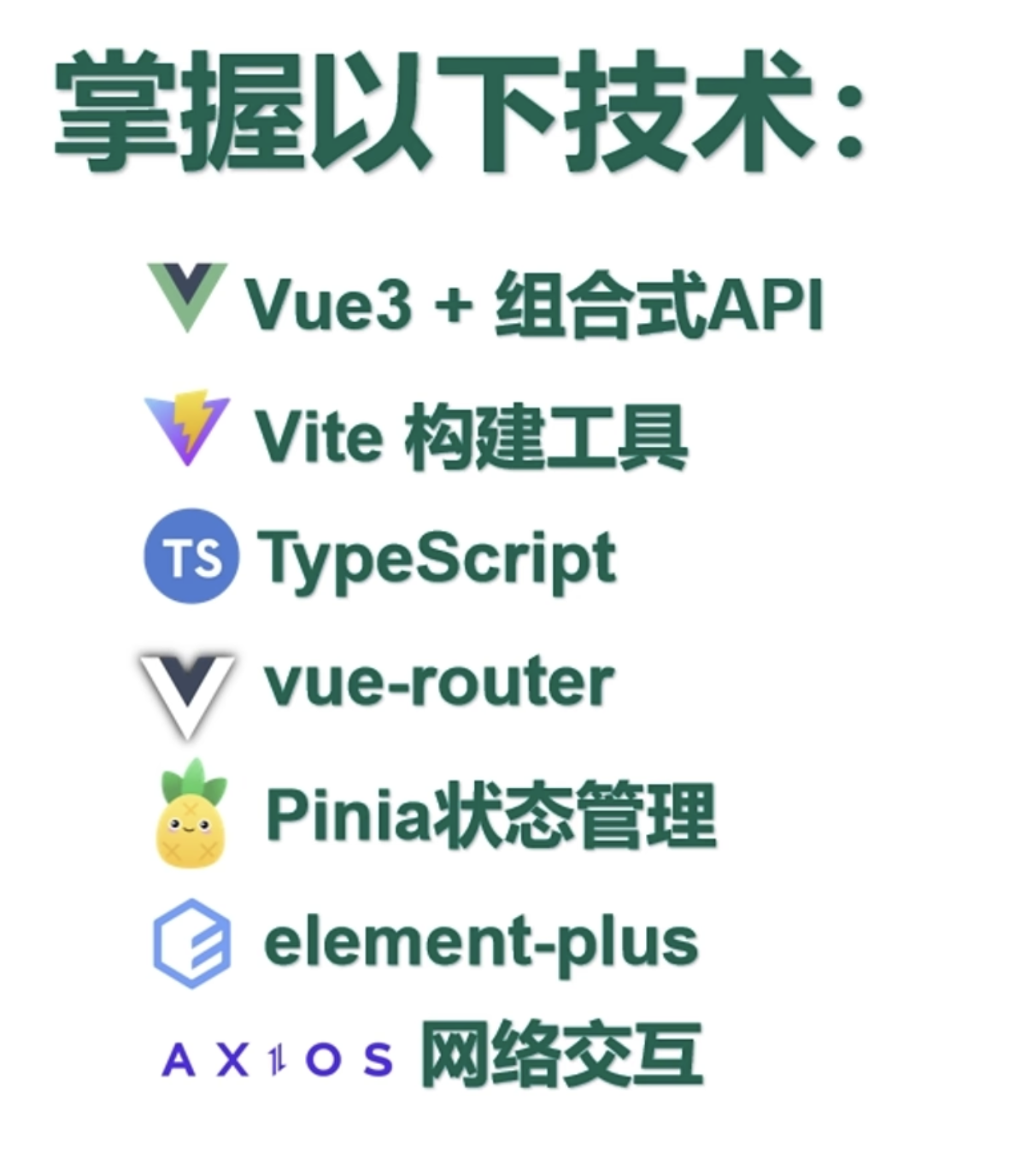
技术栈:
vue项目内校验语法,格式的一些插件
1
2
3
| -.eslintrc.js #Es语法校验设置
-.prettierrc.js #格式化配置
-.stylelintrc #样式格式化配置
|
Vue项目结构
1
2
3
4
| -index.html #程序入口html
-src
|-main.ts #项目入口文件
|-App.vue #项目主组件
|
Vue 的组件可以按两种不同的风格书写:选项式 API 和组合式 API。
选项式api
1
2
3
4
5
6
7
8
9
10
11
12
13
14
15
16
17
18
19
20
21
22
23
24
25
26
27
28
29
30
|
<script>
export default {
data() {
return {
count: 0
}
},
methods: {
increment() {
this.count++
}
},
mounted() {
console.log(`The initial count is ${this.count}.`)
}
}
</script>
<template>
<button @click="increment">Count is: {{ count }}</button>
</template>
|
组合式api
1
2
3
4
5
6
7
8
9
10
11
12
13
14
15
16
17
18
19
20
21
|
<script setup>
import { ref, onMounted } from 'vue'
const count = ref(0)
function increment() {
count.value++
}
onMounted(() => {
console.log(`The initial count is ${count.value}.`)
})
</script>
<template>
<button @click="increment">Count is: {{ count }}</button>
</template>
|
vue文件结构
1
2
3
4
5
6
7
8
9
10
11
12
13
14
15
16
17
18
19
20
| <!-- `template` 对应 HTML 代码 -->
<template>
<div>
<!-- 一些 HTML -->
</div>
</template>
<!-- `script` 部分对应 JavaScript 代码 -->
<!-- 还支持其他语言,例如 `lang="ts"` 代表当前使用 TypeScript 编写 -->
<script>
export default {
// 这里是变量、函数等逻辑代码
}
</script>
<!-- `style` 部分对应 CSS 代码 -->
<!-- 还支持开启 `scoped` 标识,让 CSS 代码仅对当前组件生效,不会全局污染 -->
<style scoped>
/* 一些 CSS 代码 */
</style>
|
添加和删除列表操作的例子
1
2
3
4
5
6
7
8
9
10
11
12
13
14
15
16
17
18
19
20
21
22
23
24
25
26
27
28
29
30
31
32
33
34
35
| <script setup>
import { ref } from 'vue'
let id = 0
const newTodo = ref('')
const todos = ref([
{ id: id++, text: 'Learn HTML' },
{ id: id++, text: 'Learn JavaScript' },
{ id: id++, text: 'Learn Vue' }
])
function addTodo() {
todos.value.push({ id: id++, text: newTodo.value })
newTodo.value = ''
}
function removeTodo(todo) {
todos.value = todos.value.filter((t) => t !== todo)
}
</script>
<template>
<form @submit.prevent="addTodo">
<input v-model="newTodo">
<button>Add Todo</button>
</form>
<ul>
<li v-for="todo in todos" :key="todo.id">
{{ todo.text }}
<button @click="removeTodo(todo)">X</button>
</li>
</ul>
</template>
|
computed方法的运用
1
2
3
4
5
6
7
8
9
10
11
12
13
14
15
16
17
18
19
20
21
22
23
24
25
26
27
28
29
30
31
32
33
34
35
36
37
38
39
40
41
42
43
44
45
46
47
48
49
50
51
| <script setup>
import { ref, computed } from 'vue'
let id = 0
const newTodo = ref('')
const hideCompleted = ref(false)
const todos = ref([
{ id: id++, text: 'Learn HTML', done: true },
{ id: id++, text: 'Learn JavaScript', done: true },
{ id: id++, text: 'Learn Vue', done: false }
])
const filteredTodos = computed(() => {
return hideCompleted.value
? todos.value.filter((t) => !t.done)
: todos.value
})
function addTodo() {
todos.value.push({ id: id++, text: newTodo.value, done: false })
newTodo.value = ''
}
function removeTodo(todo) {
todos.value = todos.value.filter((t) => t !== todo)
}
</script>
<template>
<form @submit.prevent="addTodo">
<input v-model="newTodo">
<button>Add Todo</button>
</form>
<ul>
<li v-for="todo in filteredTodos" :key="todo.id">
<input type="checkbox" v-model="todo.done">
<span :class="{ done: todo.done }">{{ todo.text }}</span>
<button @click="removeTodo(todo)">X</button>
</li>
</ul>
<button @click="hideCompleted = !hideCompleted">
{{ hideCompleted ? 'Show all' : 'Hide completed' }}
</button>
</template>
<style>
.done {
text-decoration: line-through;
}
</style>
|
watch监听方法的使用说明
1
2
3
4
5
6
7
8
9
10
11
12
13
14
15
16
17
18
19
20
21
22
23
24
25
| <script setup>
import { ref, watch } from 'vue'
const todoId = ref(1)
const todoData = ref(null)
async function fetchData() {
todoData.value = null
const res = await fetch(
`https://jsonplaceholder.typicode.com/todos/${todoId.value}`
)
todoData.value = await res.json()
}
fetchData()
watch(todoId, fetchData)
</script>
<template>
<p>Todo id: {{ todoId }}</p>
<button @click="todoId++">Fetch next todo</button>
<p v-if="!todoData">Loading...</p>
<pre v-else>{{ todoData }}</pre>
</template>
|
通过defineProps函数实现父组件动态传递数值给子组件
ChildVue
1
2
3
4
5
6
7
8
9
| <script setup>
const props = defineProps({
msg: String
})
</script>
<template>
<h2>{{ msg || 'No props passed yet' }}</h2>
</template>
|
FatherVue
1
2
3
4
5
6
7
8
9
10
11
| <script setup>
import { ref } from 'vue'
import ChildComp from './ChildComp.vue'
const greeting = ref('Hello from parent')
</script>
<template>
<ChildComp :msg="greeting" />
</template>
|
子组件定义插槽会自动的获取父组件的值
ChildVue
1
2
3
| <template>
<slot>Fallback content</slot>
</template>
|
FatherVue
1
2
3
4
5
6
7
8
9
10
| <script setup>
import { ref } from 'vue'
import ChildComp from './ChildComp.vue'
const msg = ref('from parent')
</script>
<template>
<ChildComp>Message: {{ msg }}</ChildComp>
</template>
|
通过emit函数实现子组件向父组件传递值
ChildVue
1
2
3
4
5
6
7
8
9
| <script setup>
const emit = defineEmits(['response'])
emit('response', 'hello from child')
</script>
<template>
<h2>Child component</h2>
</template>
|
FatherVue
1
2
3
4
5
6
7
8
9
10
11
| <script setup>
import { ref } from 'vue'
import ChildComp from './ChildComp.vue'
const childMsg = ref('No child msg yet')
</script>
<template>
<ChildComp @response="(msg) => childMsg = msg" />
<p>{{ childMsg }}</p>
</template>
|
变量操作的使用说明
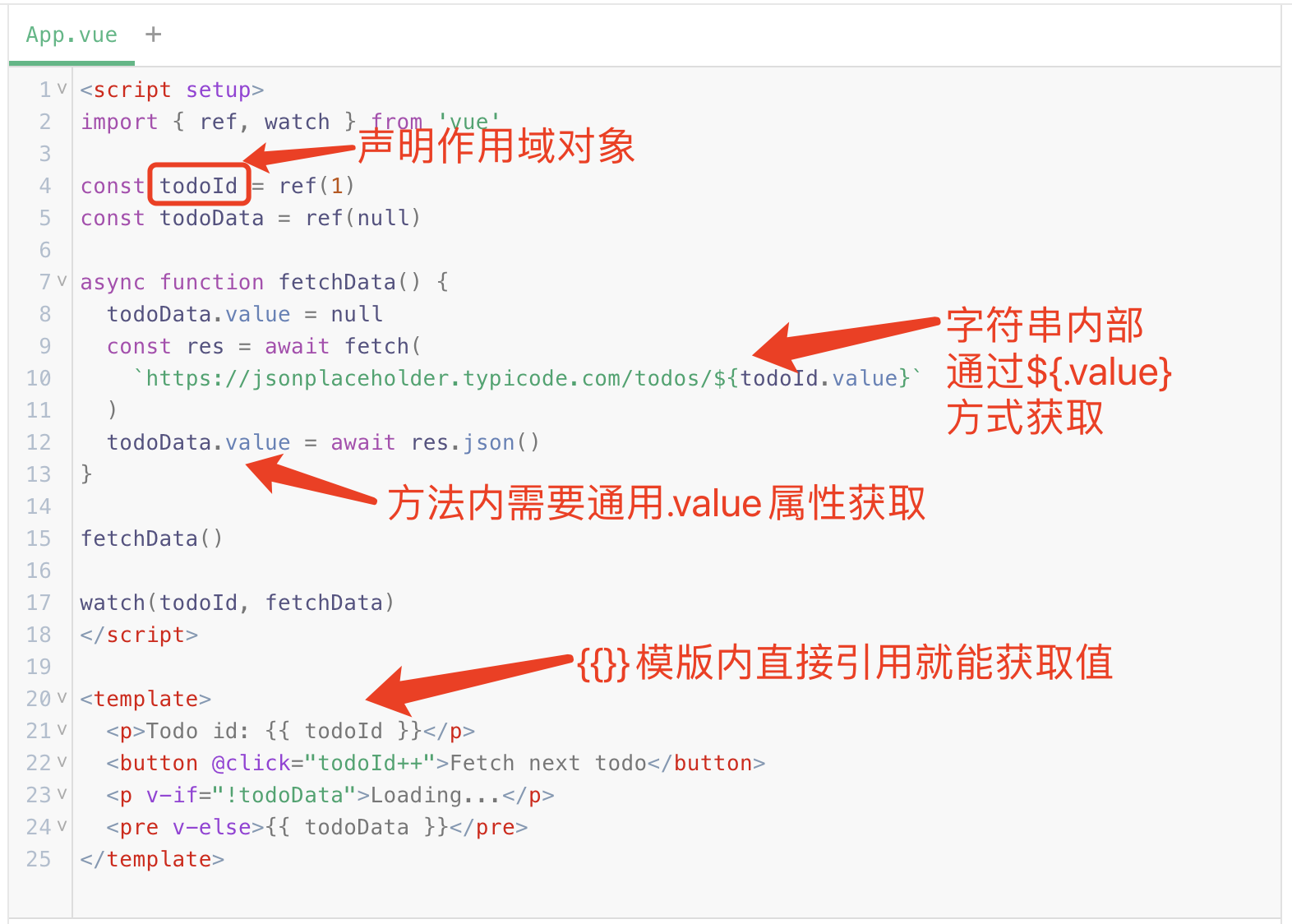
App 开发
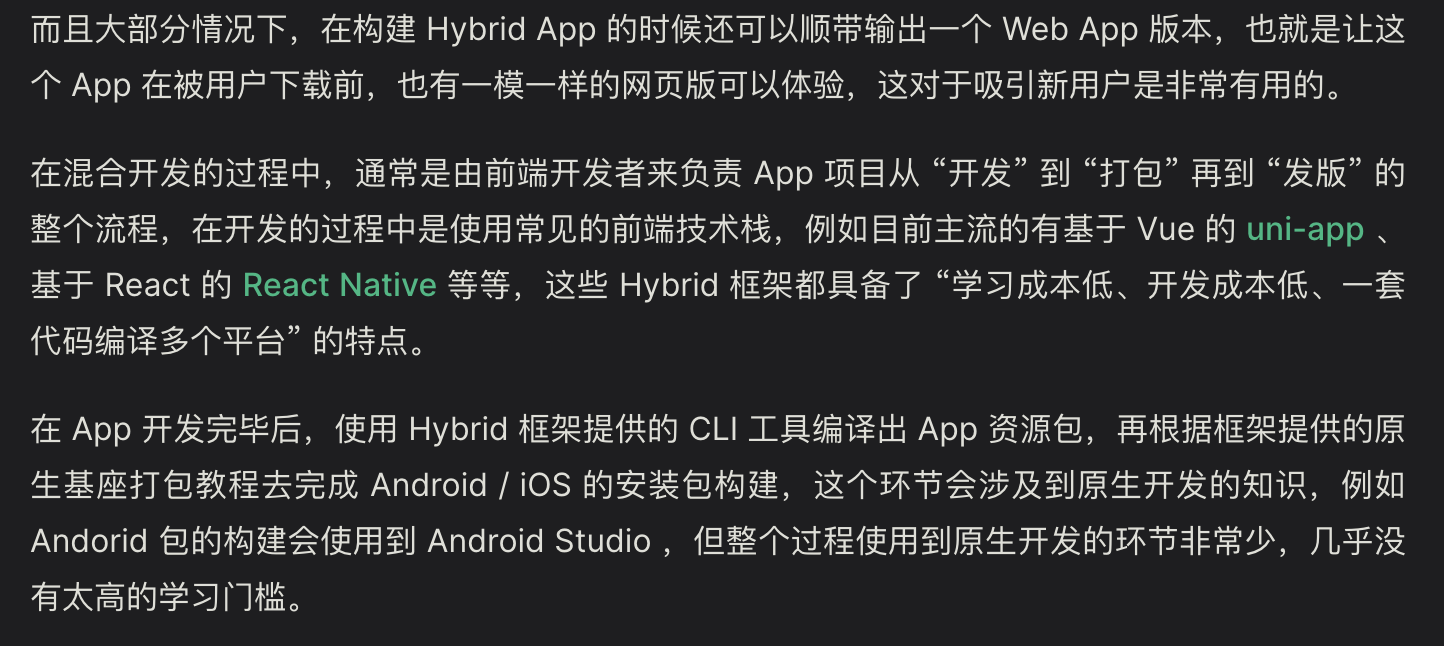
桌面程序开发
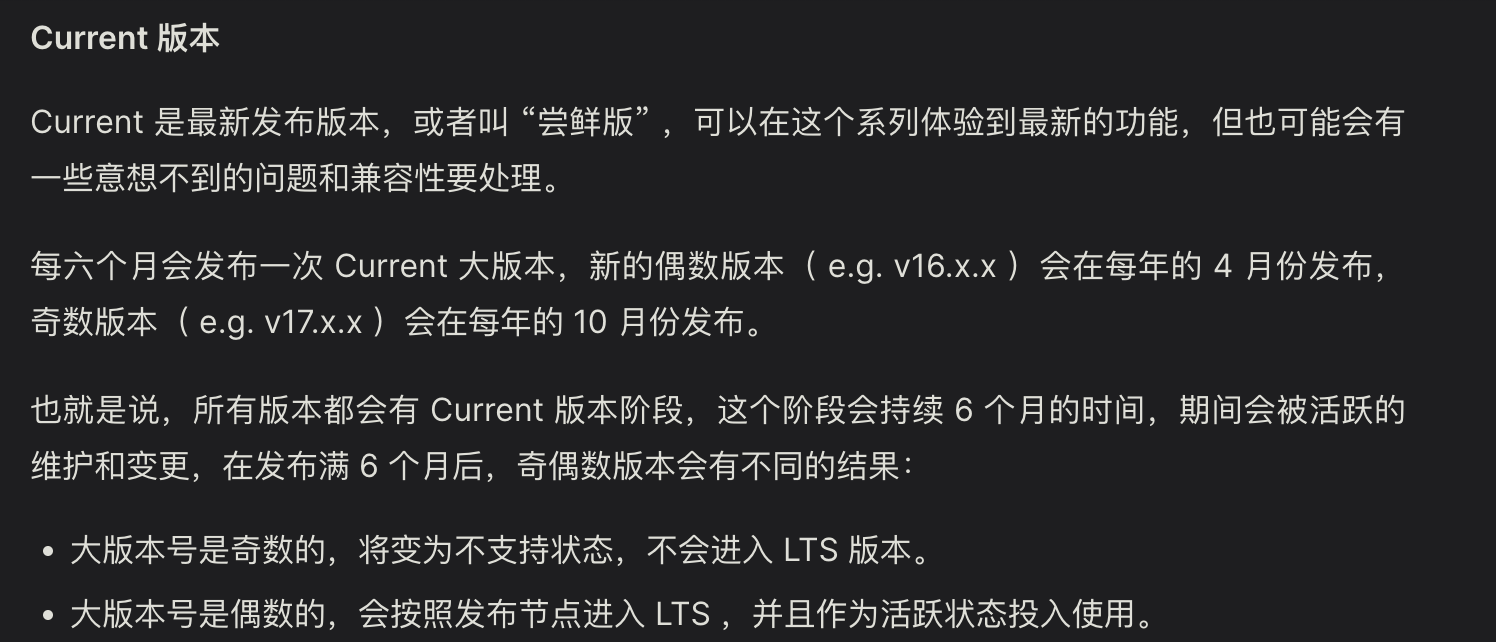
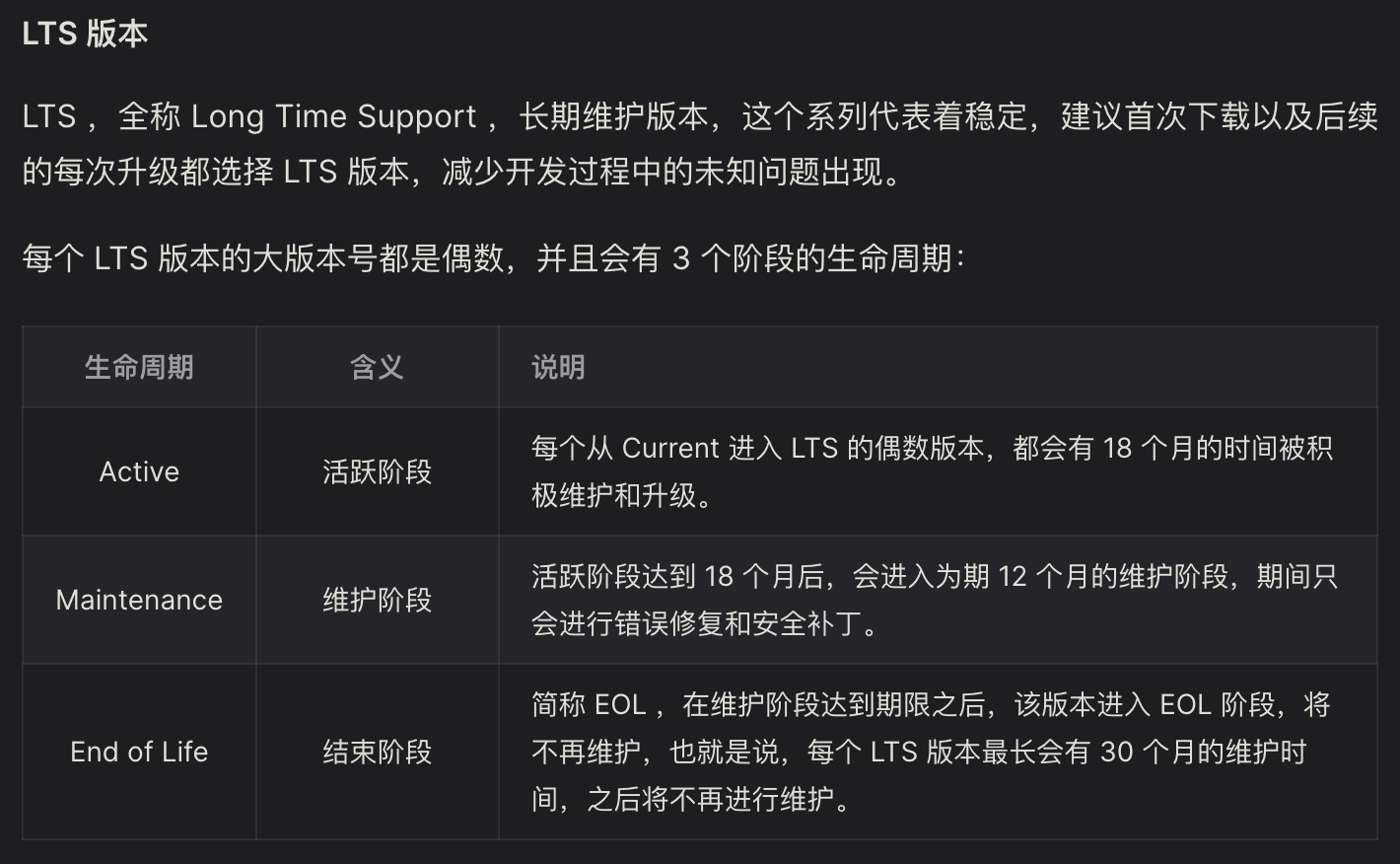
node.js的版本维护说明,中文下载官网(https://nodejs.org/zh-cn/download)
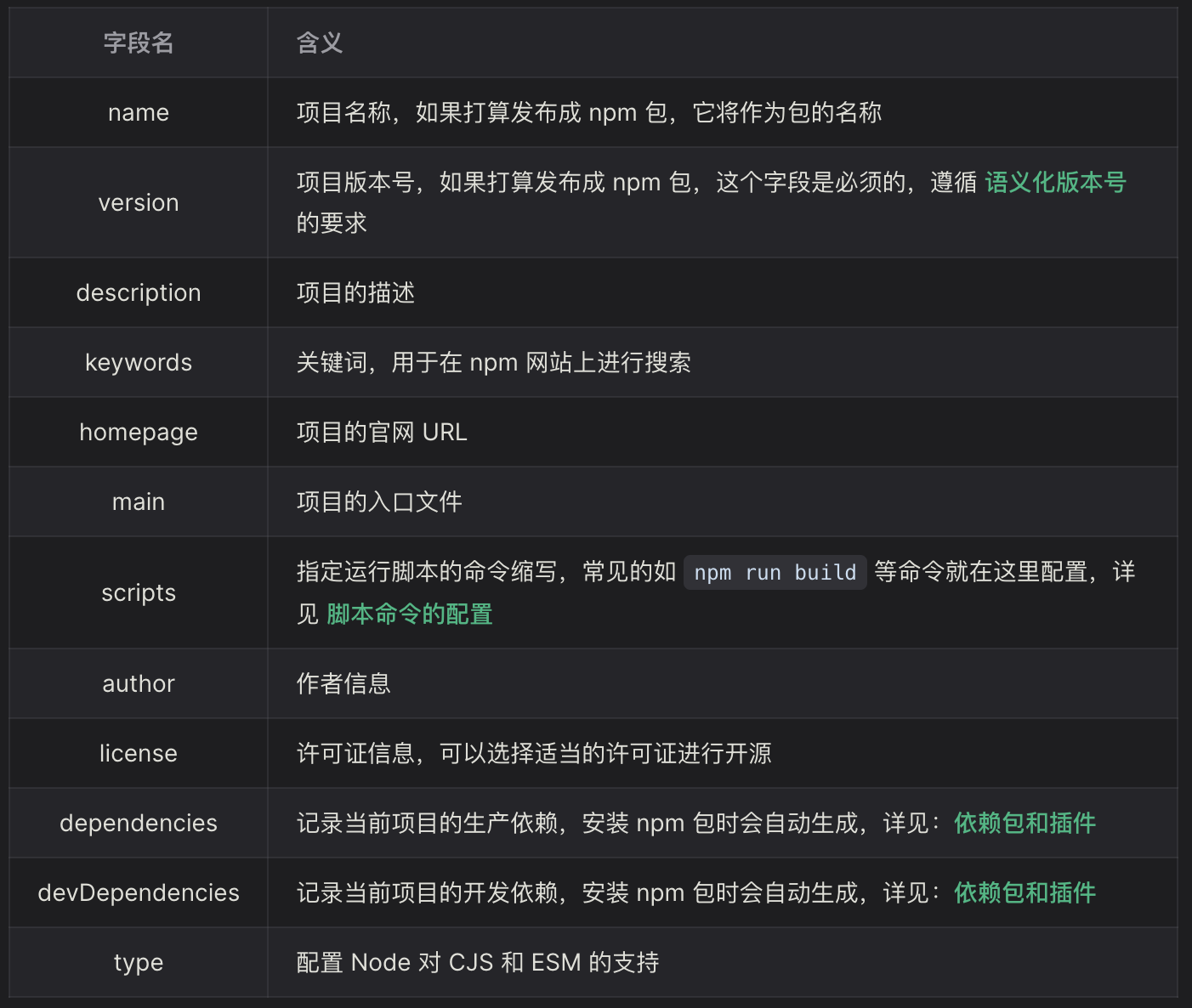
package.json说明:
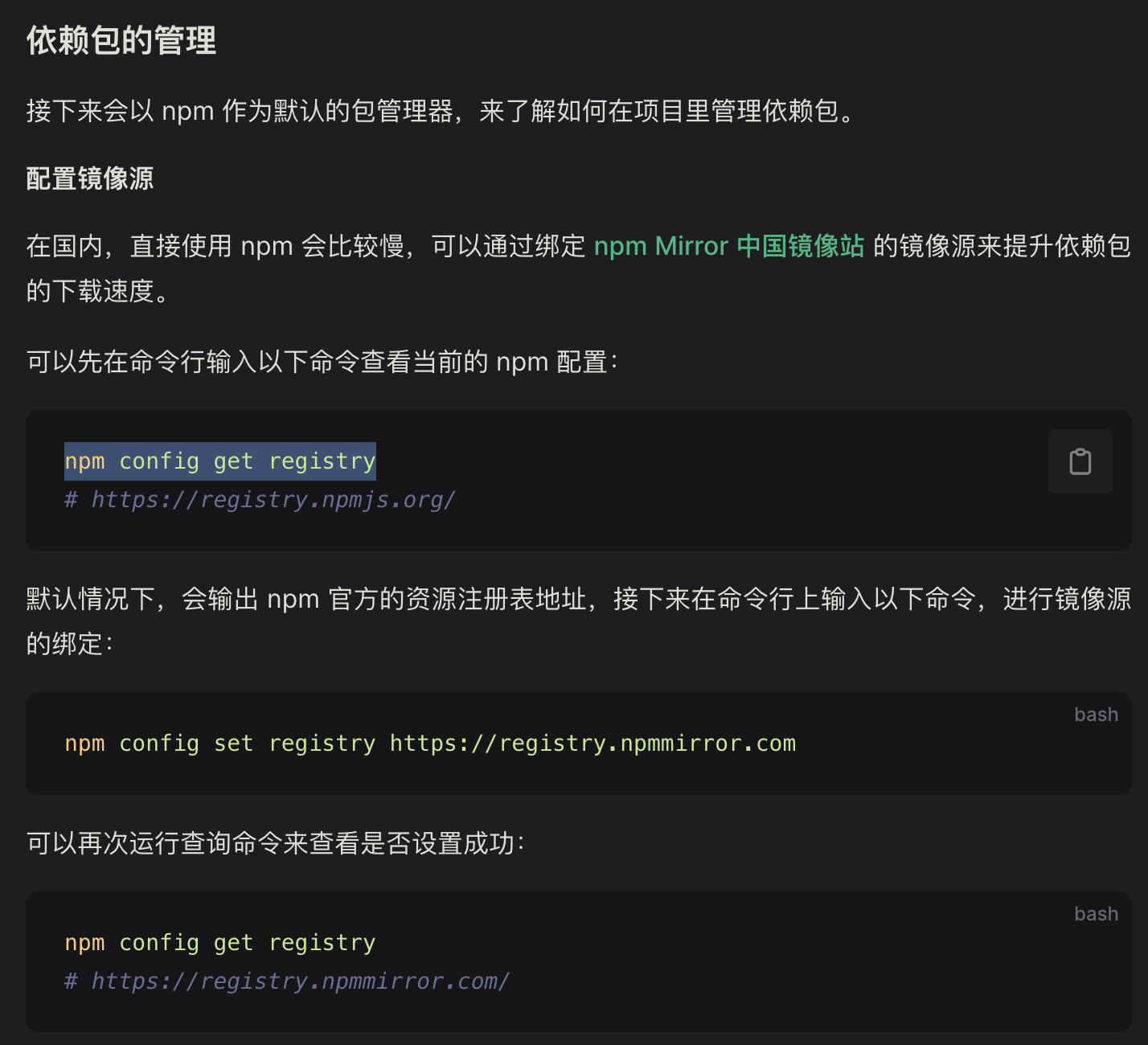
依赖包管理,替换国内npm镜像源:
1
2
3
4
5
6
7
8
9
| #查看npm的镜像源
npm config get registry
#修改镜像
npm config set registry https://registry.npmmirror.com
npm install -g cnpm --registry=https://registry.npm.taobao.org
#再次查看镜像源
npm config get registry
|
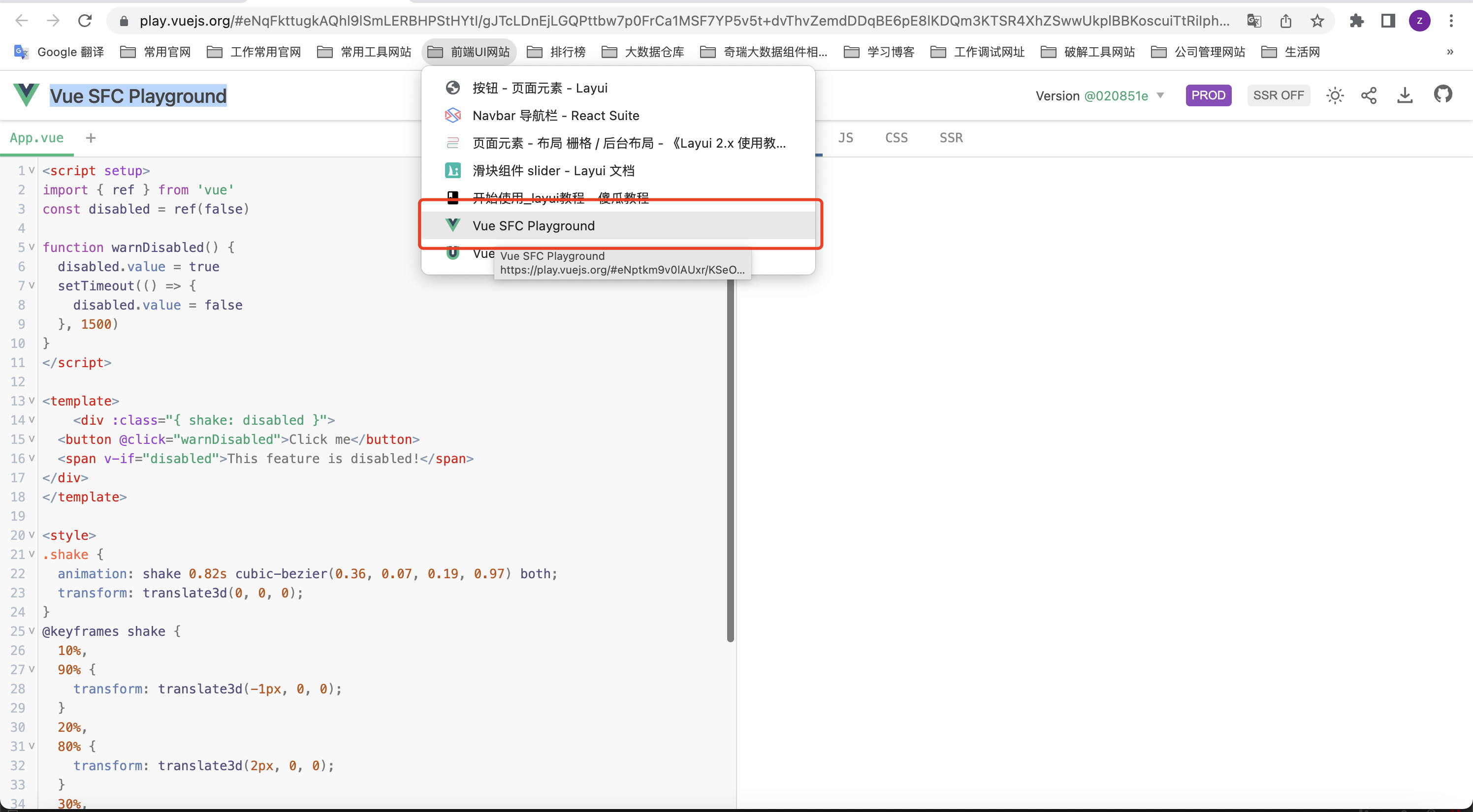
单文件测试地址
Vue SFC Playground
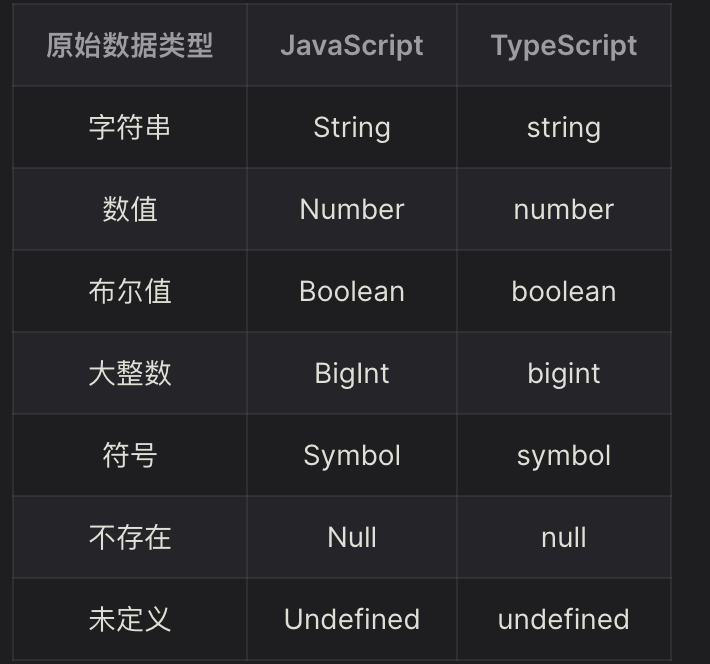
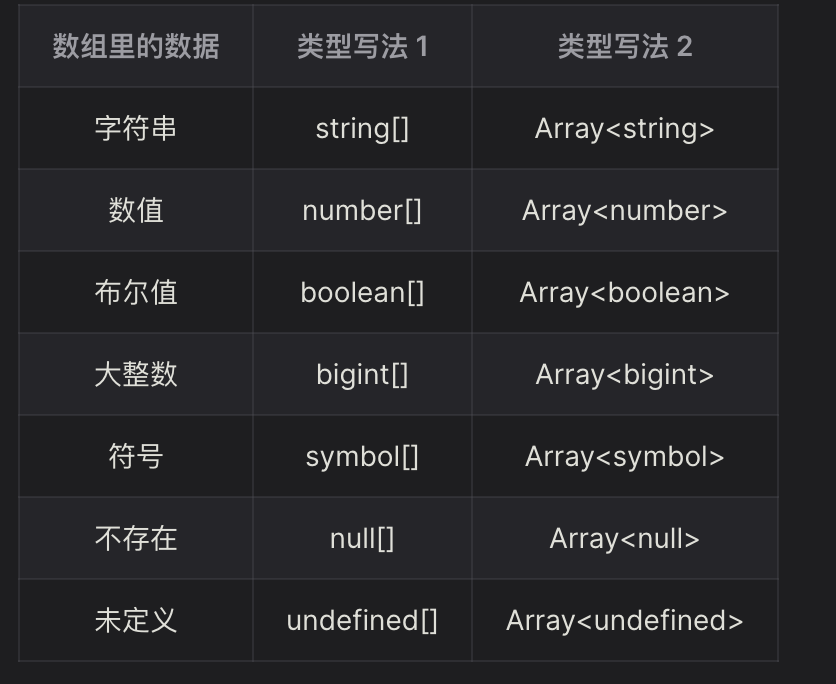
Typescript类型:
在 JavaScript 中,let 和 const 都是用来声明变量的关键字,它们的主要区别在于变量的可变性和作用域范围。
问题:
1.打包问题
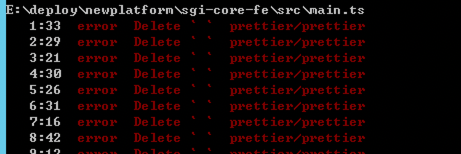
error Delete ␍ prettier/prettier 打包出错
解决方案:
设置下git拉取代码换行符自动转换问题:
1
| git config --global core.autocrlf false
|
然后重新拉取下分支即可正常打包.
2.i18n再js或ts文件中的使用
1
2
3
4
5
| import i18n from "@/lang/index"
const tips = i18n.global.t('return')
//取i18n的locale值
const localeValue =i18n.global.locale.value
|
参考博客:
https://www.jianshu.com/p/fffe291d7d3e
- 测试环境项目打包时提示
import_vite_plugin_svg_icons.createSvgIconsPlugin) is not a function
原因是因为,查看package.json里面的vite_plugin_svg_icons发现版本是0.1.0所以没有对应方法
解决办法是gitlab上的test分支没有同步跟新导致的,删除原有测试分支,重新clone下测试分支即可解决
参考博客:
https://www.cnblogs.com/yehx/p/17081436.html
4.i18n切换,下拉框里面的枚举值没有正常切换
解决办法:使用vue的computed方法进行加载切换,代码如下:
1
2
3
4
5
6
7
8
9
10
11
12
13
14
15
16
17
| // * 系统全局字典
//引入中英文切换
import i18n from "@/languages";
//使用computed进行挂载
import { computed } from "vue";
//定义i18n.global.t方法简写
const $t = i18n.global.t;
/**
* @description:是否停用
*/
export const isDisabledType = computed(() => {
return [
{ label: $t("dict.whether.yes"), value: "Y" },
{ label: $t("dict.whether.no"), value: "N" }
];
});
|
5.重置自定义store仓库的方法
注意执行方法调用需要带()
1
2
3
4
5
6
7
8
9
10
11
12
13
14
15
16
17
18
19
20
21
22
23
| //使用store自带的reset方法
import { AuthStore } from "@/stores/modules/auth";
import { TabsStore } from "@/stores/modules/tabs";
const authStore = AuthStore();
const tabsStore = TabsStore();
// 3.清空authStore和tabsStore
authStore.$reset();
tabsStore.$reset();
//第二种方式,在actions自定义清空属性的方法
//重置store
async resetStore() {
this.routeName = "";
this.authButtonList = {};
this.authMenuList = [];
this.authMenuTitleMap = new Map();
}
//引用方法
// 3.清空authStore和tabsStore
authStore.resetStore();
tabsStore.$reset();
|
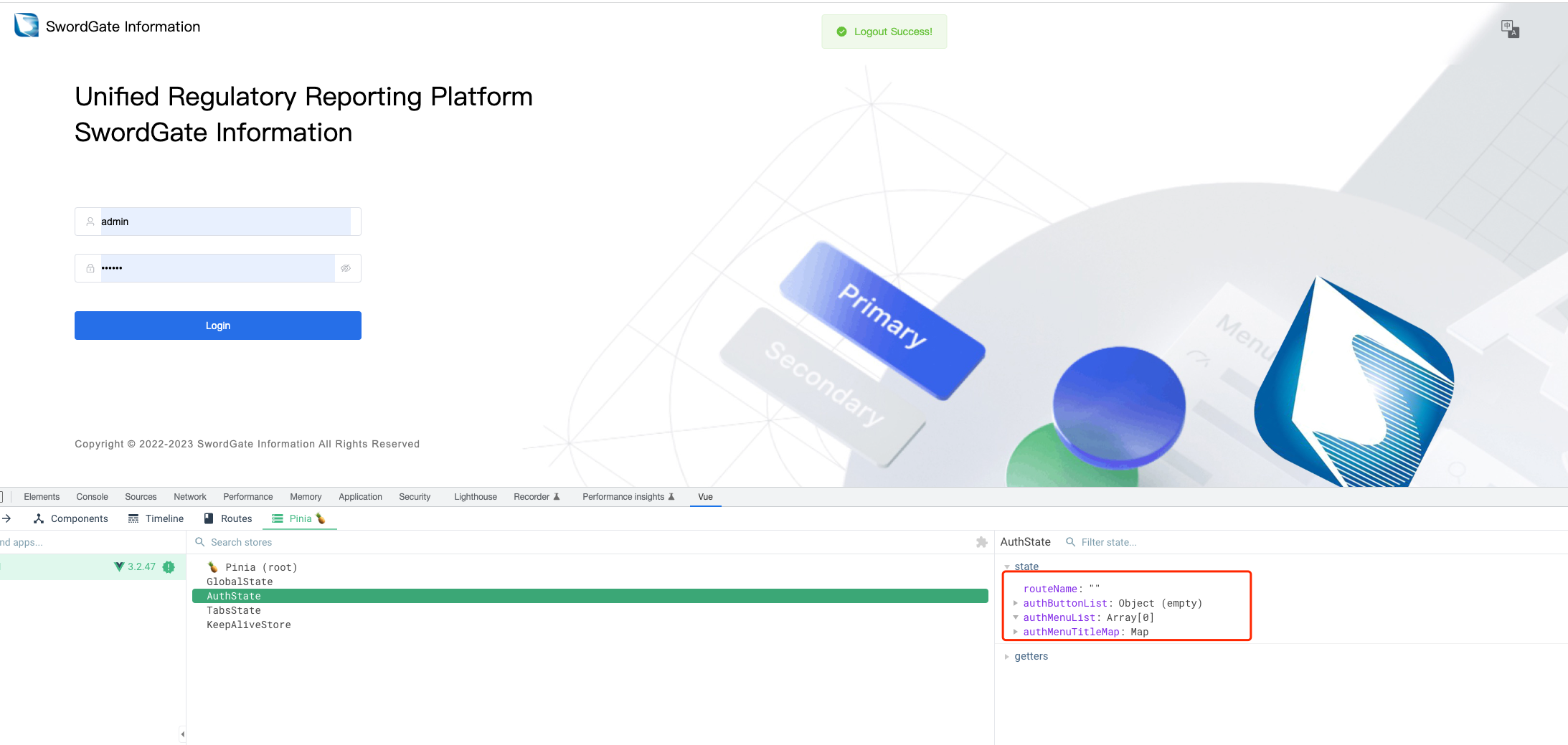
退出时执行结果如下:
退出前:
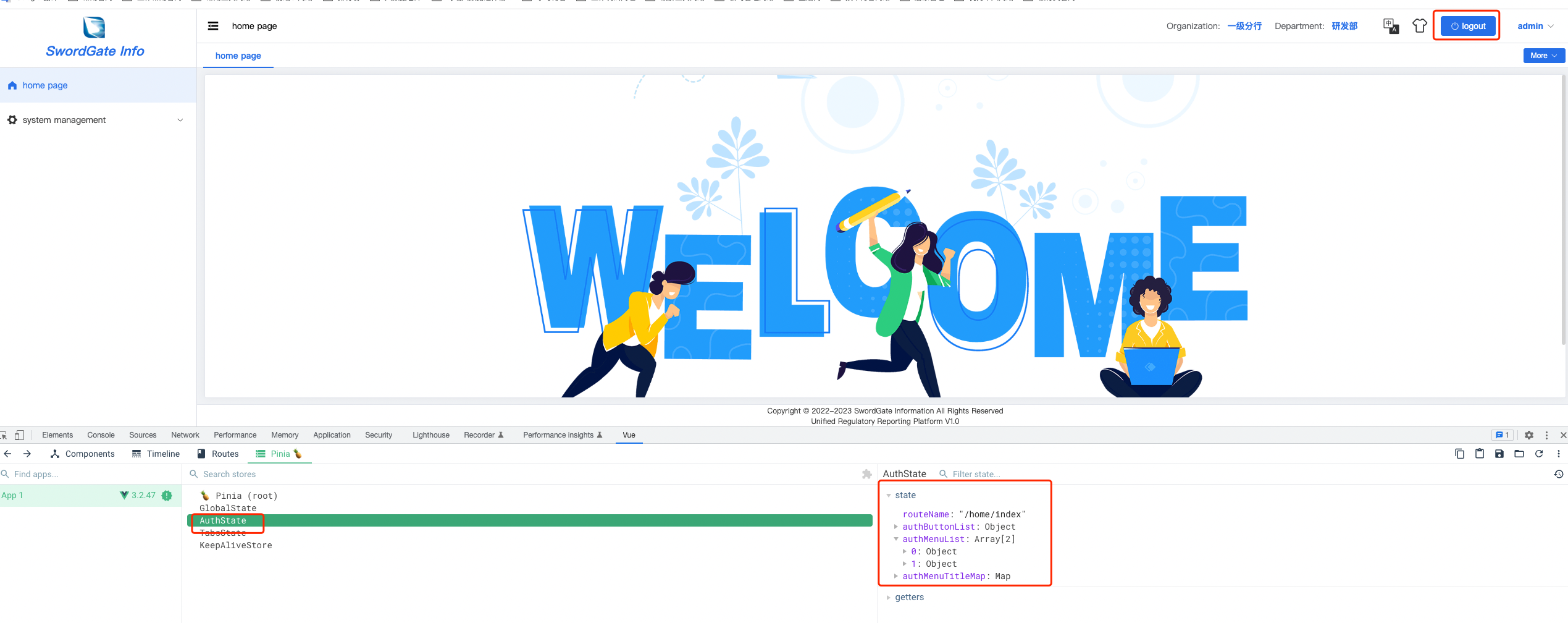
退出后:
6.vue3添加加载刷新
方式一:局部刷新tabs页
MoreButton.vue
1
2
3
4
5
6
7
8
9
10
11
12
13
14
15
16
17
| import { computed, inject, nextTick } from "vue";
import { KeepAliveStore } from "@/stores/modules/keepAlive";
const keepAliveStore = KeepAliveStore();
const refreshCurrentPage: Function = inject("refresh") as Function;
// refresh current page
const refresh = () => {
setTimeout(() => {
keepAliveStore.removeKeepAliveName(route.name as string);
refreshCurrentPage(false);
nextTick(() => {
keepAliveStore.addKeepAliveName(route.name as string);
refreshCurrentPage(true);
});
}, 0);
};
|
方式二
App.vue(注释部分)
1
2
3
4
5
6
7
8
9
10
11
12
13
14
15
16
17
18
19
20
21
22
23
24
25
26
27
28
29
30
31
32
33
34
35
36
37
38
39
40
41
42
43
44
45
| <template>
<el-config-provider :locale="i18nLocale" :button="config" :size="assemblySize">
<!-- <router-view v-if="isRouter"></router-view> -->
<router-view></router-view>
</el-config-provider>
</template>
<script setup lang="ts">
// import { reactive, computed, nextTick, provide, ref } from "vue";
import { reactive, computed } from "vue";
import { GlobalStore } from "@/stores";
import { useTheme } from "@/hooks/useTheme";
import { getBrowserLang } from "@/utils/util";
import { ElConfigProvider } from "element-plus";
import zhCn from "element-plus/es/locale/lang/zh-cn";
import en from "element-plus/es/locale/lang/en";
const globalStore = GlobalStore();
const { initTheme } = useTheme();
initTheme();
//刷新路由配置 TODO 后面需要全局刷新在开启对应注释
// const isRouter = ref(true);
// const reload = () => {
// isRouter.value = false;
// nextTick(() => {
// isRouter.value = true;
// });
// };
// provide("reload", reload);
// element config
const config = reactive({ autoInsertSpace: false });
// element language
const i18nLocale = computed(() => {
if (globalStore.language == "zh") return zhCn;
if (globalStore.language == "en") return en;
return getBrowserLang() == "zh" ? zhCn : en;
});
// element assemblySize
const assemblySize = computed(() => globalStore.assemblySize);
</script>
|
对应页面使用Language.vue(注释掉的部分,主要使用inject方法)
1
2
3
4
5
6
7
8
9
10
11
12
13
14
15
16
17
18
19
20
21
22
23
24
25
26
27
28
29
30
31
32
33
34
35
36
37
38
39
40
41
42
43
44
45
46
47
48
49
50
51
52
53
54
55
56
57
58
59
60
61
62
63
64
65
66
| <template>
<el-dropdown trigger="click" @command="handleSetLanguage">
<i :class="'iconfont icon-zhongyingwen'" class="toolBar-icon"></i>
<template #dropdown>
<el-dropdown-menu>
<el-dropdown-item :disabled="language && language === 'zh'" command="zh">简体中文</el-dropdown-item>
<el-dropdown-item :disabled="language === 'en'" command="en">English</el-dropdown-item>
</el-dropdown-menu>
</template>
</el-dropdown>
</template>
<script setup lang="ts">
import { computed, onMounted } from "vue";
import { useI18n } from "vue-i18n";
import { GlobalStore } from "@/stores";
import { getBrowserLang } from "@/utils/util";
import { localSet } from "@/utils/util";
import { switchLanguage } from "@/api/modules/language";
import { synLanguageConfig } from "@/utils/language";
import { LanguageSwitch } from "@/api/interface";
// import { inject } from "vue";
import { TabsStore } from "@/stores/modules/tabs";
import { initDynamicRouter } from "@/routers/modules/dynamicRouter";
const i18n = useI18n();
const globalStore = GlobalStore();
const language = computed((): string => globalStore.language);
// const reload: any = inject("reload");
// 切换语言
const handleSetLanguage = async (lang: string) => {
//刷新页面
// reload();
initLanguage(lang);
if (globalStore.token) {
//调用后端接口
let param: LanguageSwitch = { language: synLanguageConfig(globalStore.language) };
await switchLanguage(param);
// 3.添加动态路由
await initDynamicRouter();
//成功后,刷新TabsStore的值
TabsStore().flushTabs();
}
};
const initLanguage = (lang: string) => {
//调试中英文设置(cn|en)
// lang = "cn";
i18n.locale.value = lang;
globalStore.updateLanguage(lang);
localSet("GlobalState.language", lang);
let title = globalStore.title;
//i18n切换标签页 过滤动态路由页签中英文切换
if (title.indexOf(".") != -1) {
title = i18n.t(globalStore.title);
}
//页签标题中英文显示
document.title = title + "-" + i18n.t("login.systemName");
};
onMounted(() => {
initLanguage(language.value || getBrowserLang());
});
</script>
|
7.vue3组合式api自带组件定义引用使用
1
| import { ref, reative, toRefs, toRef, computed, watch, readonly, onCreated, onMounted, onUpdated, nextTick, provide, inject, h}
|
参考博客
https://juejin.cn/post/7220681875743866939
8.用户管理菜单出现下面警告
Component inside renders non-element root node that cannot be animated,如图:
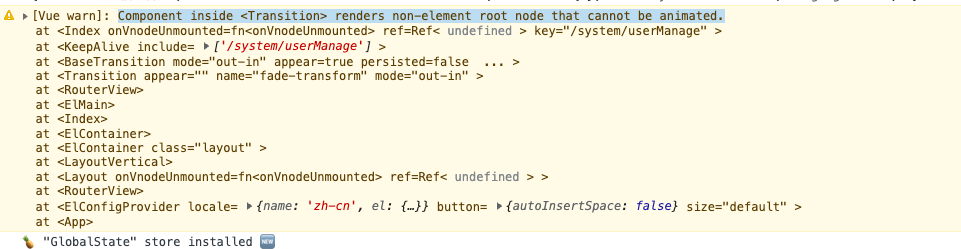
点击其他页面component就会加载不了页面.
解决办法:
因为自定义的userManage下面的vue的template下面出现了多个根标签导致的,外层套个div即可解决
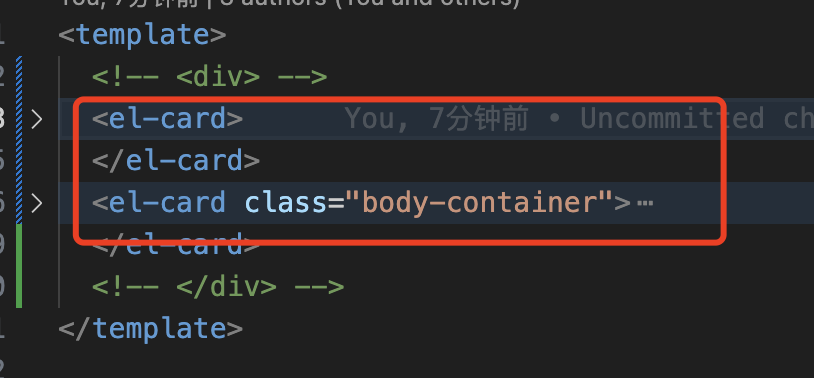
参考博客:
https://juejin.cn/post/7000664887290495013
https://blog.csdn.net/sinat_36728518/article/details/123106147
9.v-for和v-show组合使用,v-for和v-if尽量不要组合使用
代码示例
1
2
3
4
5
6
7
8
9
10
11
12
13
14
15
16
17
18
19
20
| <el-table-column label="角色" width="120" show-overflow-tooltip>
<template #default="{ row }">
<el-text
class="mx-1"
v-for="(item, index) in row.roleLists"
:key="item.id"
v-show="index !== row.roleLists.length - 1"
>
{{ item.roleName }},
</el-text>
<el-text
class="mx-1"
v-for="(item, index) in row.roleLists"
:key="item.id"
v-show="index === row.roleLists.length - 1"
>
{{ item.roleName }}
</el-text>
</template>
</el-table-column>
|
参考博客: https://zhuanlan.zhihu.com/p/613703420
el-table-column自定义说明参考博客: https://www.cnblogs.com/mmzuo-798/p/14626515.html
表格渲染说明:
https://blog.csdn.net/HanXiaoXi_yeal/article/details/121767161
https://blog.csdn.net/meimeib/article/details/111075715
https://blog.csdn.net/qq_44813690/article/details/114634419
table字体颜色和背景
https://blog.csdn.net/qq_32610671/article/details/90731672
table背景颜色不生效
https://blog.csdn.net/weixin_46533954/article/details/119912772
10.vite vue3的打包管理工具,配置代理说明参考博客
https://zxuqian.cn/vite-proxy-config/
vite打包后在本地运行
https://blog.csdn.net/pujun1201/article/details/125720592
引入静态文件
https://www.qiyuandi.com/zhanzhang/zonghe/10423.html
https://blog.csdn.net/qq_41038929/article/details/120568082
https://juejin.cn/post/7109441209315098654
https://blog.csdn.net/qq_41038929/article/details/120568082
11.cascader输入框内容宽度自适应:
https://www.cnblogs.com/robinunix/p/11679265.html
https://github.com/element-plus/element-plus/issues/5331
12.promise用法:
https://blog.csdn.net/Adam_captain/article/details/120923905
13.表格居中显示的方式,参考博客:
https://www.jianshu.com/p/8c2849558786
14.form表单
居中展示:
https://blog.csdn.net/TheSpiritIsHeart/article/details/118579244
15.div文字靠上排列的方式
https://zhidao.baidu.com/question/2266241751789252548.html
16.组合是函数的用法:
https://juejin.cn/post/7220681875743866939
computed函数用法
https://www.51cto.com/article/694187.html
reactive对应用法参考博客:
https://blog.csdn.net/wwwwwqj/article/details/113947571
